|
|||||||||||||||
 |
|
 |
|||||||||||||
 |
|
 |
|||||||||||||
 |
|||||||||||||||
| |
|||||||||||||||
|
|
|
|||||||||||||
|
|
|
|||||||||||||
|
|||||||||||||||
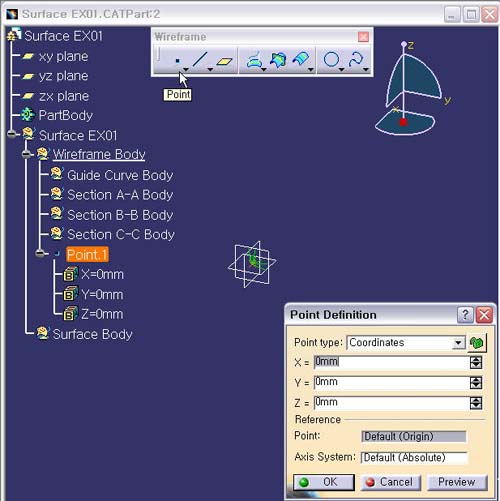
1. 현재 작업
위치을 Wireframe Body로 이동한다.
Wireframe
Body에서 Mouse
오른쪽 버튼을 클릭하여
Contextual Menu의 Define In Work Object를
설정한다.
2. Point 생성한다.
Point -> Coordinates -> (0,0,0)
입력한다.
3. 생성 Point.1 이름 변경하기
생성 Point.1에서 마우스 오른쪽 버튼을 눌러
Contextual Menu의 Properties -> Feature Properties ->
Center Point -> OK
4. Center Point선택 후, Graphics Properties
Tool Bar에서 노란색 Color, Point Type은 사각형 모양의
Point 로 Graphics을 수정한 다.
(Graphics
Properties Tool Bar 는 View -> Toolbars 에
Graphics
Properties Tool Bar를 Check 하면 나타난다.)