|
|||||||||||||||
 |
|
 |
|||||||||||||
 |
|
 |
|||||||||||||
 |
|||||||||||||||
| |
|||||||||||||||
|
|
|
|||||||||||||
|
|
|
|||||||||||||
|
|||||||||||||||
1. 현재 작업
위치을 Section C-C Body로 이동한다.
Section
C-C Body 에서 Mouse
오른쪽 버튼을 클릭하여
Define In Work
Object로
설정한다.
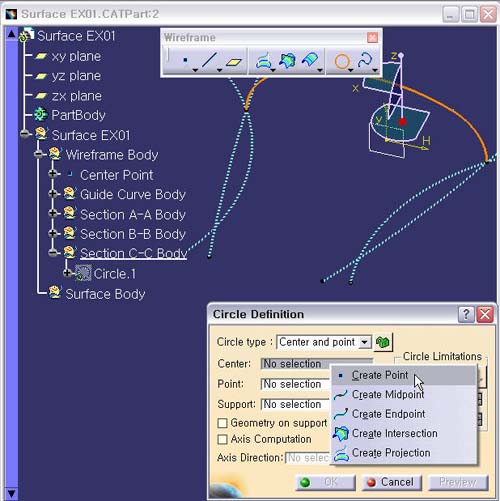
2. Circle 생성 작업하기.
Circle 아이콘을 선택한다.
Circle Definition에서
Circle
type : Center and point
Center : No Selection에서
마우스를 놓고 오른쪽 버튼을 눌러
Create
Point의 Running Command 로 들어간다.