|
|||||||||||||||
 |
|
 |
|||||||||||||
 |
|
 |
|||||||||||||
 |
|||||||||||||||
| |
|||||||||||||||
|
|
|
|||||||||||||
|
|
|
|||||||||||||
|
|||||||||||||||
1. Split 작업하기
Split 아이콘을 선택한다.
Element to cut : 208mm Offset Plane From ZX Plane
Wireframe Body는 Hide
한다.
Cutting element : No Selection에서
마우스를 놓고 오른쪽
버튼을
눌러 Create Boundary 의 Running
Command
로 들어 간다.
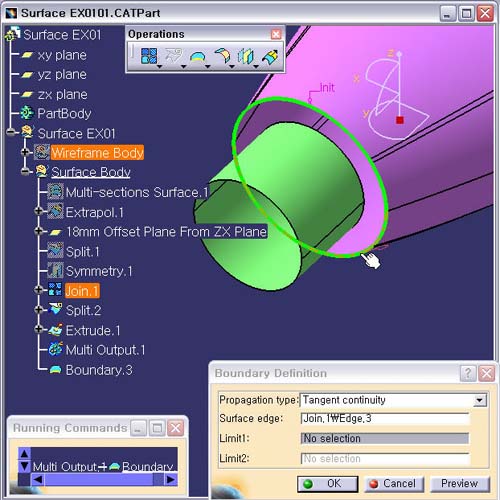
2. Boundary Definition 창으로 들어온다.
Propagation type : Tangent Continuity
Surface
edge : Join.1 Surface의 Edge Curve를 선택한다.
Preview
버튼을 확인후, OK 버튼을 클릭한다.