|
|||||||||||||||
 |
|
 |
|||||||||||||
 |
|
 |
|||||||||||||
 |
|||||||||||||||
| |
|||||||||||||||
|
|
|
|||||||||||||
|
|
|
|||||||||||||
|
|||||||||||||||
1. Geometrical Set 추가하기
Insert -> Geometrical Set
Geometrical Set에서 선택
후, Alt + Enter 키를 누른다.
Properties -> Feature Properties -> Feature
Name ->
2nd Step -> OK
2. Point.1의 이름은 Center Point로 수정한다.
3. 하단의 View Tools Tool Bar에서 Display를 Top
View 상태로
화면을 두고 작업한다.
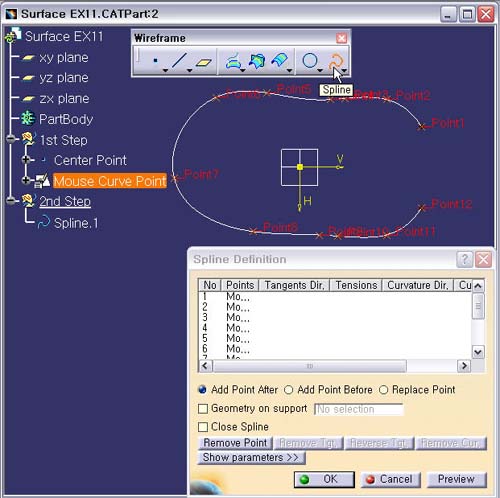
4. Spline 아이콘을 선택한다.
Mouse
Curve Point Sketch에서 다음의 Point.1부터 Point.12
까지 반시계방향으로
순서대로 선택을 한다.
5. Preview 버튼을 눌러 확인 후, OK 버튼을 클릭한다.