|
|||||||||||||||
 |
|
 |
|||||||||||||
 |
|
 |
|||||||||||||
 |
|||||||||||||||
| |
|||||||||||||||
|
|
|
|||||||||||||
|
|
|
|||||||||||||
|
|||||||||||||||
1. Part 새 문서 창 열기
File
-> New -> Part -> OK
2. Workbench는 Generative Shape Design
에서 시작한다.
Start -> Shape -> Generative Shape Design
3. Specifications Tree의 Part1을 선택
후, Alt + Enter 키를 누른다.
Properties ->
Product -> Part Number -> Surface EX14
-> OK
4. Geometrical Set 추가하기
Insert -> Geometrical Set
Geometrical Set에서 선택
후, Alt + Enter 키를 누른다.
Properties -> Feature Properties -> Feature
Name ->
Wireframe Body -> OK
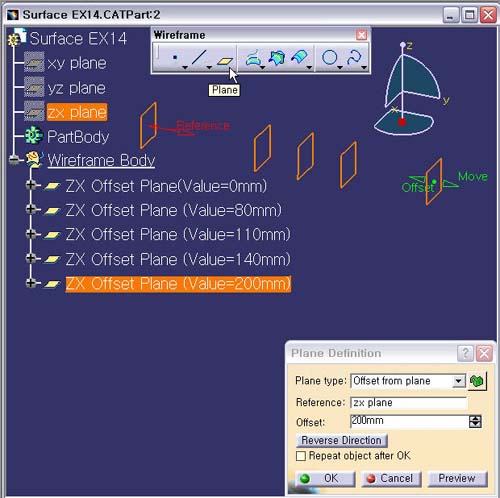
5. Plane 아이콘을 선택한다.
Plane
Type : Offset from Plane
Reference : ZX Plane
Offset : 0mm
OK
버튼을 누른다.
생성 Planes의 이름은 ZX Offset
Plane (Value=0mm)로 한다.
6. Plane 작업을 반복하여 다음과 같은 5개의 Plane을 만든다.
7. 저장하기
Ctrl
+ S 버튼을 누른다.