|
|||||||||||||||
 |
|
 |
|||||||||||||
 |
|
 |
|||||||||||||
 |
|||||||||||||||
| |
|||||||||||||||
|
|
|
|||||||||||||
|
|
|
|||||||||||||
|
|||||||||||||||
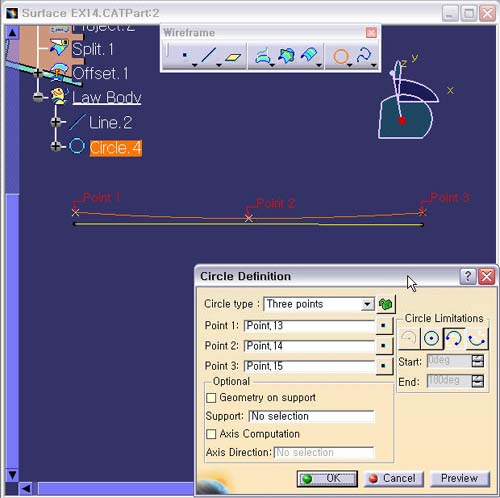
1. Circle
Definition 창으로 돌아온다.
Point.2 : No
Selection에서 마우스 오른쪽 버튼의 Contextual
Menu의
Create Point를 선택한다.
2. Point Definition 창으로 들어 온다.
Point Type : On Plane
Plane
: XY Plane
H : 50mm
V
: 2mm
3. OK 버튼을 클릭한다.
4. Circle Definition 창으로 돌아온다.
Point.3 : No Selection에서 마우스 오른쪽 버튼의
Contextual
Menu의 Create Point를 선택한다.
5. Point Definition 창으로 들어 온다.
Point Type : On Plane
Plane
: XY Plane
H : 100mm
V
: 4mm
6. OK 버튼을 클릭한다.
7. Circle Definition 창으로 돌아온다.
8. Circle Limitations에서 3번째 아이콘이 선택 되어 있는지 확인한다
9. OK 버튼을 클릭한다.