|
|||||||||||||||
 |
|
 |
|||||||||||||
 |
|
 |
|||||||||||||
 |
|||||||||||||||
| |
|||||||||||||||
|
|
|
|||||||||||||
|
|
|
|||||||||||||
|
|||||||||||||||
1. Variable Radius Fillet 작업하기
현재 작업
위치을 Draft.1 으로 이동한다.
Draft.1에서 Mouse
오른쪽 버튼을 클릭하여 Define In Work
Object로
설정 한다.
Variable
Radius Fillet 아이콘을
선택한다.
Parting
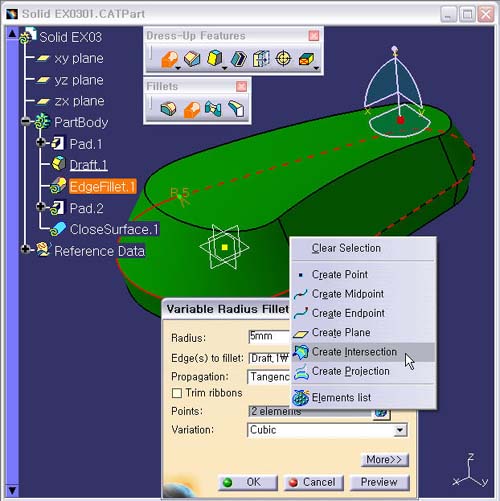
Curve인 Fillet 작업 Edge를 선택한다.
Definition
창 영역 내의 Points 항목에서 Mouse
오른쪽 버튼을
클릭하여 Contextual Menu에 Create
Intersection 아이콘을
선택한다.