|
|||||||||||||||
 |
|
 |
|||||||||||||
 |
|
 |
|||||||||||||
 |
|||||||||||||||
| |
|||||||||||||||
|
|
|
|||||||||||||
|
|
|
|||||||||||||
|
|||||||||||||||
1. Variable Fillet 작업하기
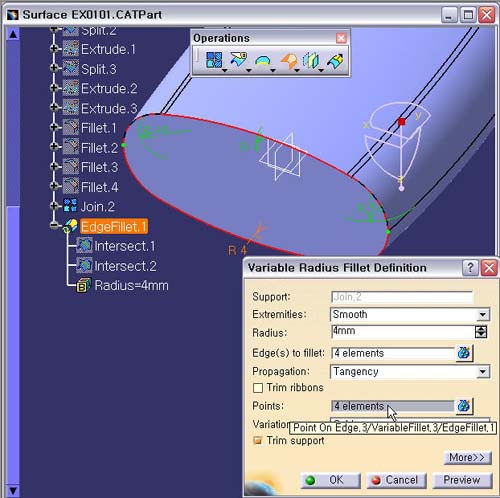
Points : 5 elements 영역을 마우스로 선택 후,
오른쪽 버튼을
눌러
Create Intersection 의 Running Command 로
다시
들어 간다.
2. Intersection Definition 창으로
들어온다.
First Element : yz plane
Second Element : Join.2 의 바닥 Edge 하부 Curve
를 선택한다.
Preview 버튼을 확인후, OK 버튼을
클릭한다.
2. Variable
Fillet Definition 창으로 돌아온다.
Fillet Value 가 필요 없는 Point 지점은 마우스로
녹색 Point를
확대하여 선택한다.
Points : 4 element 가 되어 있어야 한다.
Preview 버튼을 확인후, OK 버튼을 클릭한다.