|
|||||||||||||||
 |
|
 |
|||||||||||||
 |
|
 |
|||||||||||||
 |
|||||||||||||||
| |
|||||||||||||||
|
|
|
|||||||||||||
|
|
|
|||||||||||||
|
|||||||||||||||
1. Geometrical Set 추가하기
Insert -> Geometrical Set
Geometrical Set에서 선택
후, Alt + Enter 키를 누른다.
Properties -> Feature Properties -> Feature
Name ->
5th Step -> OK
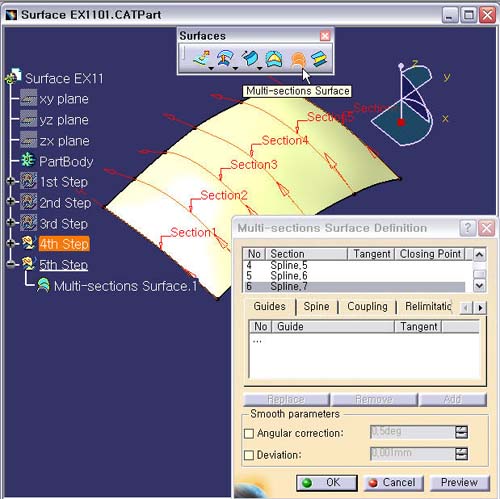
2. Multi-Section Surface 아이콘을 선택한다.
Section 영역에서 4th
Step의 6개의 Spline Curve들을 순서대로
선택한다.
Section Curve의 방향성을 일관성
있게 한방향으로 되도록 한다.
2. Preview 버튼을 눌러 확인 후, OK 버튼을 클릭한다.